How LinqDesk runs a month of link building for ten clients
Most link building tools are built around a campaign. Agencies are not. An agency has clients, each with a monthly target, a budget, a niche and a patience level, and the real work is keeping ten of those moving at once without dropping any of them.
This is a walkthrough of what a month actually looks like in LinqDesk, in the order the work happens. If you are evaluating it, this is the honest version of the tour.
In this guide
Week 1: what does this month needWeek 1: discovery and scoringWeek 1: how do we get inWeeks 1 to 4: sendingWeeks 1 to 4: answeringWeeks 2 to 4: yes to publishedAll month: the moneyAll month: keeping links aliveMonth end: the reportOptional: the agents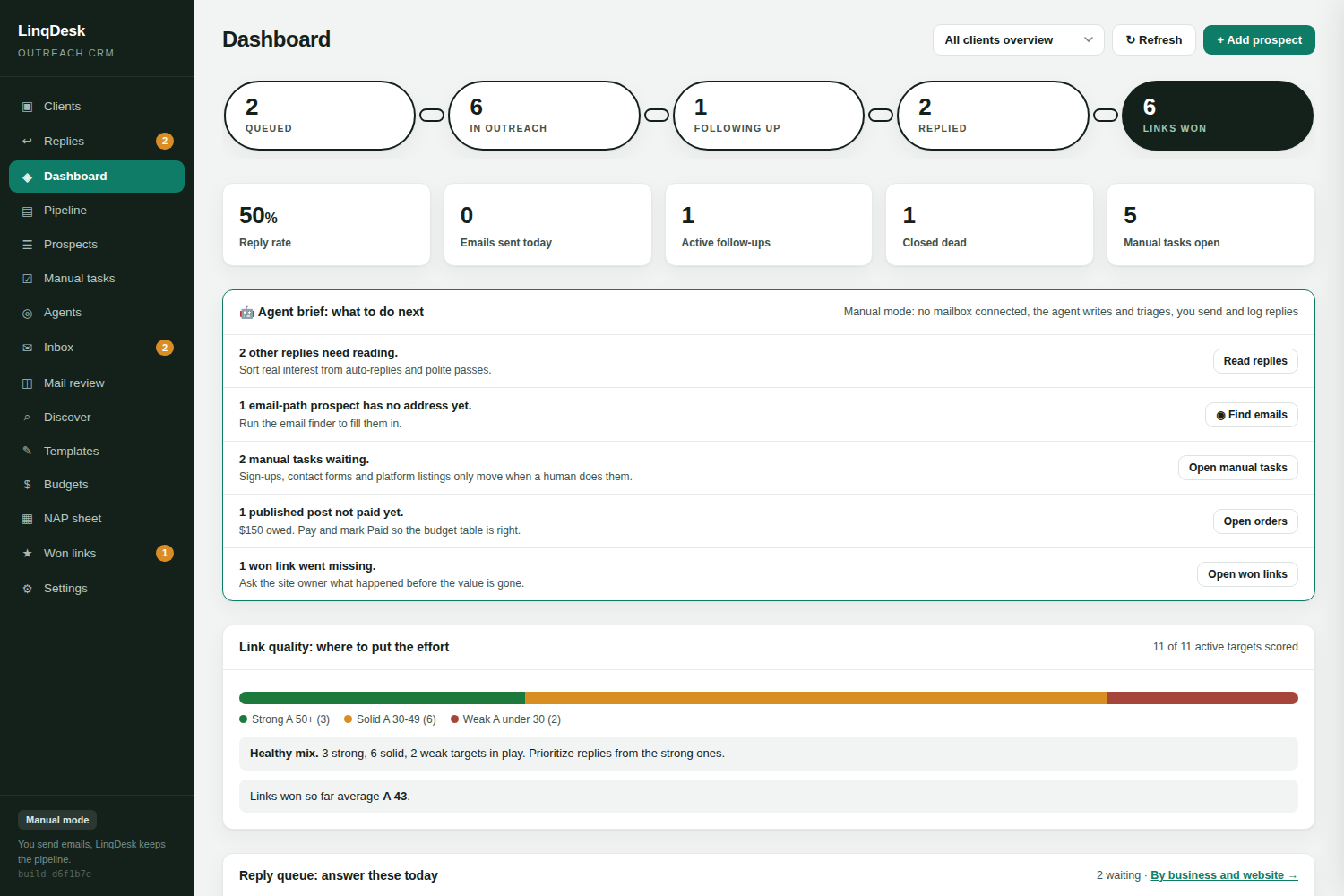
Week 1: what does this month need
You do not start from a blank prospect list. Each client has a monthly link target, and the monthly plan reads what is already true: links won so far this month, prospects currently in flight, and that client's real historical win rate. From those it works backwards to a number of qualified prospects the month still needs.
That turns a vague "do some outreach for Client A" into "Client A needs eleven more qualified prospects to hit four links this month". Every Monday a sweep tops up any client that is short and emails you what is waiting for approval, so a quiet client does not go a fortnight without anyone noticing.
Week 1: discovery and scoring
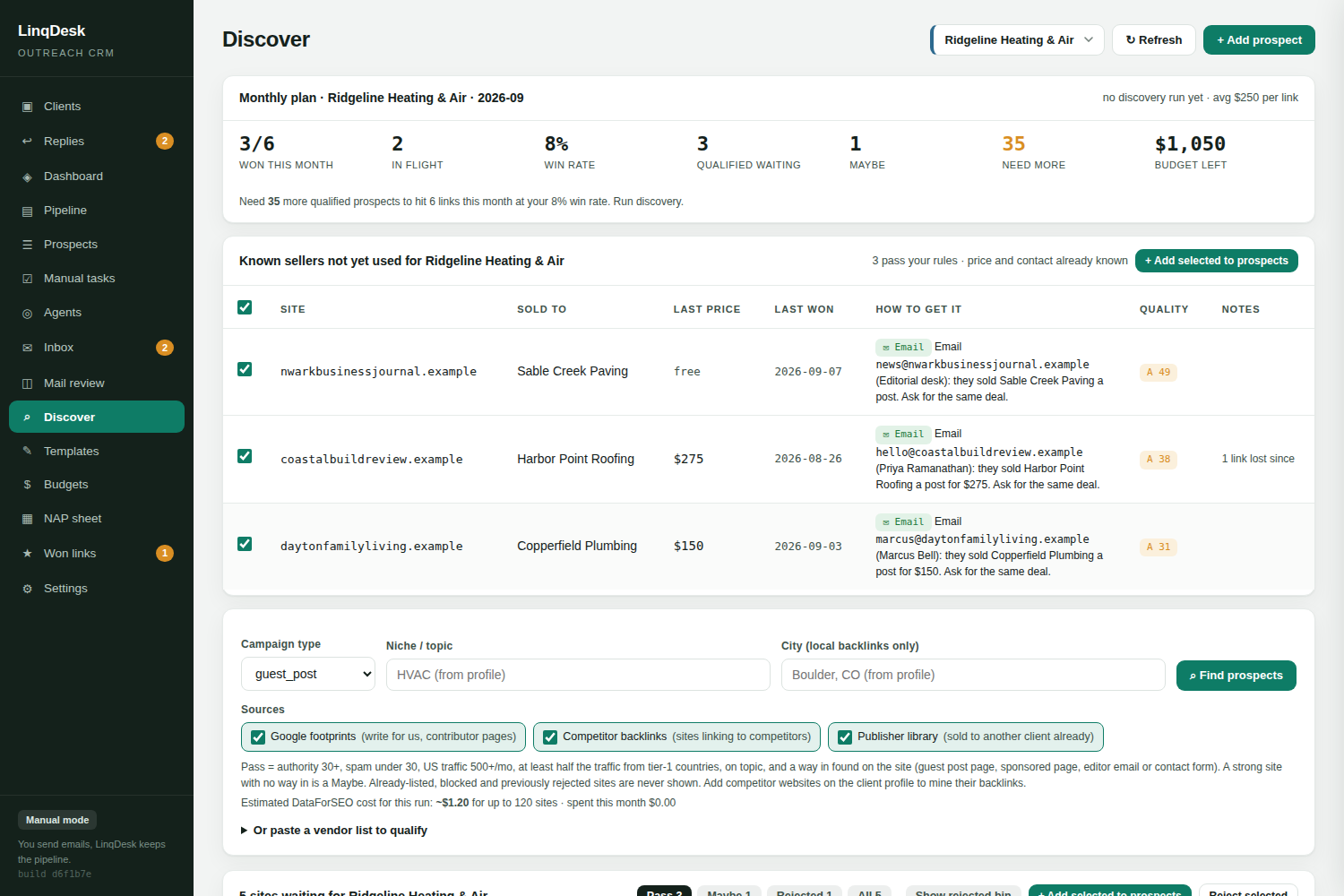
The Discover tab runs four sources for a client, and it is worth knowing which is which:
- Live Google results for write-for-us style footprints in the client's niche and city
- Competitor backlinks, pulled from the competitor domains on the client profile
- Your publisher library, meaning every site that has already sold one of your other clients a placement, with the price you paid and the contact you used
- A pasted vendor sheet, one "domain, price" per line, for the lists that land in your inbox from sellers
Everything found is then measured the way you would vet it by hand: authority, spam score, US monthly traffic, the share of traffic coming from the US, UK, Canada and Australia, the keywords it ranks for, and whether the topic actually fits the client. Each site gets a verdict of Pass, Maybe or Reject against your workspace's own buying rules, with the reasoning written out and an article angle suggested.
Local discovery runs on different rules, deliberately. A chamber, a youth league or a city page will never pass a traffic floor, so it is judged on being real, local and clean instead, and .gov pages are kept.
Three things stop you paying twice for the same research: a rejected site is never suggested again, a site measured this month is not re-measured, and every data call books its real cost against a monthly cap you set, with an estimate shown before any run starts.
Week 1: how do we get in
A qualified site is not yet a prospect, because you still do not know how to reach it. Every site that is not rejected is opened to find the way in: a write-for-us page, a sponsored post or advertising page, an editor's email, a contact form, or a sponsor or member sign-up.
With an API key configured, an AI researcher reads the site the way a person would, opening up to six pages it chooses, reading the guidelines, the fee and the link policy, and writing the procedure as numbered steps with the address and the exact page to use. That is the "How to get it" column, and it travels onto the prospect when you approve it so triage never starts over.
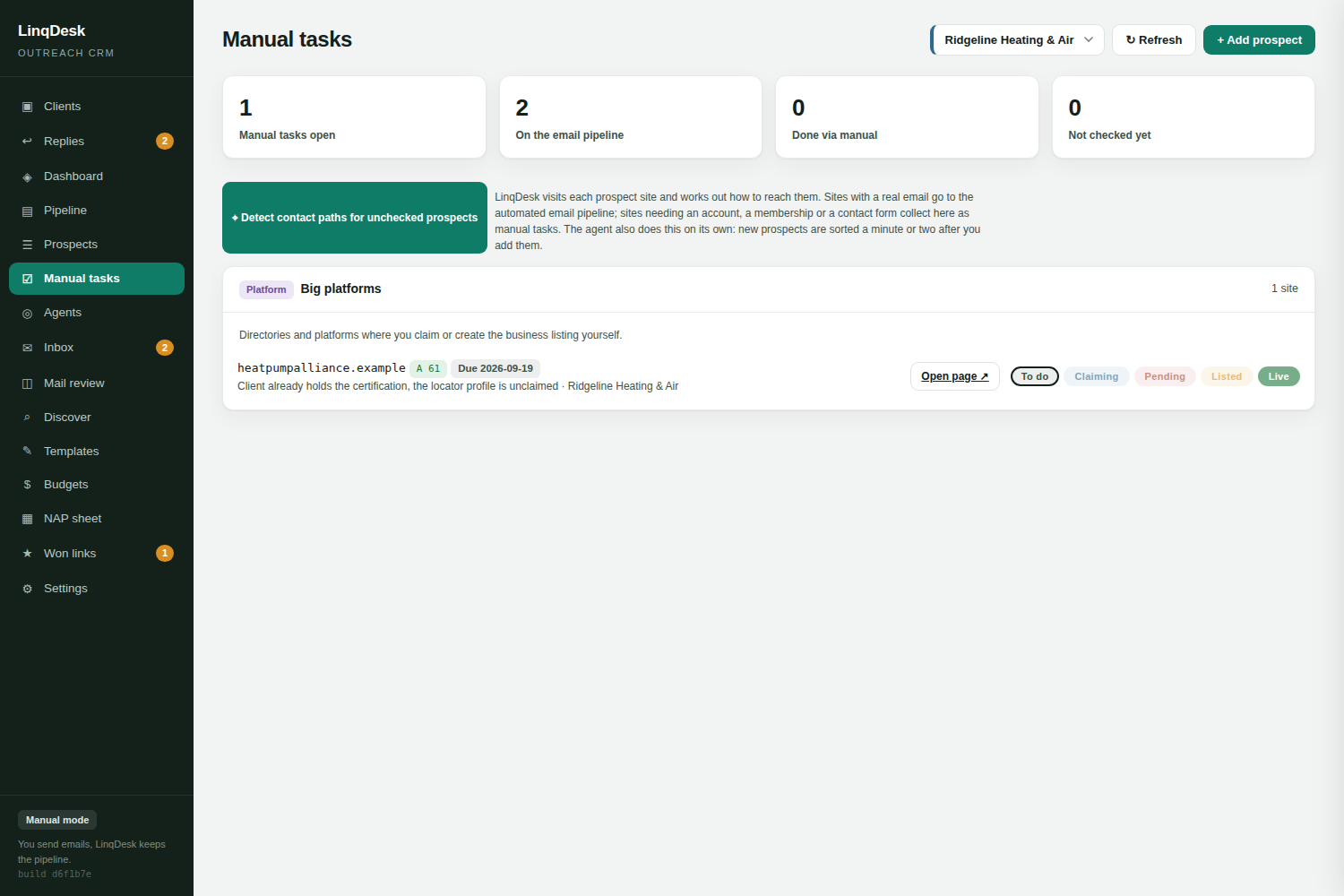
A strong site with no way in drops from Pass to Maybe rather than being thrown away. Prospects with an email address join the automated pipeline. Everything else, forms, memberships, claimed listings, lands on the manual tasks board with a To do, In progress, Submitted, Live flow of its own.
Weeks 1 to 4: sending
Mail goes out from your own mailboxes, Gmail in one click or any SMTP provider, never from a shared server IP. Each mailbox has its own daily cap, and the day's quota is spread evenly across your sending window rather than fired in one burst at 9am. Follow-ups are sent before new first emails, so a conversation you already started is never starved by the daily cap.
Sequences stop the moment a human replies, follow up twice in the same thread, and close a prospect that has gone 30 days without an answer. A late reply reopens it. Newsletters, out-of-office autoresponders and bounce notices are recognised as machine mail and never counted as a reply, and "take me off your list" closes the lead and adds the address to the do-not-contact list.
No mailbox connected? Everything above still works except automatic sending and automatic reply reading. LinqDesk writes the email, you hit Copy and mark sent or Open in mail app, and the status, follow-up dates and inbox move exactly as if it had sent. A reply that arrives in your own inbox goes in with Log their reply and is read the same way a polled one is, including bounce handling, the interest tag, the asking price and the AI summary.
Weeks 1 to 4: answering
This is where most agencies leak. Replies arrive across ten clients and several mailboxes, and the ones that needed an answer on Tuesday get answered on Friday or not at all.
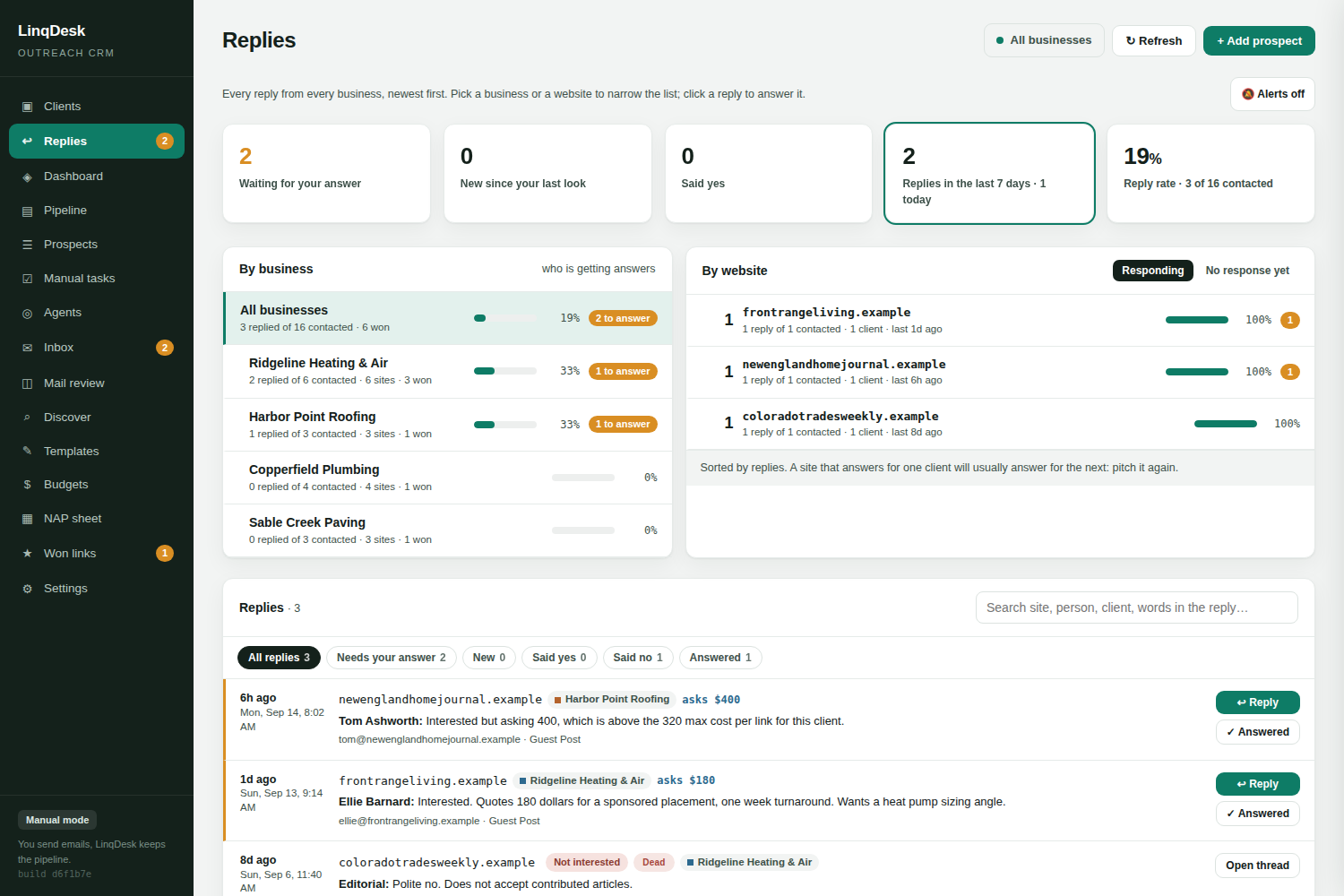
The Replies tab reads the whole workspace regardless of which client is selected: what is waiting on an answer, what has arrived since you last looked, who said yes, and the overall reply rate. Under that, a by-business list showing which clients are actually getting answers, and a by-website leaderboard of which prospect sites respond, with a No response yet tab for the ones that never do.
Each reply is classified on arrival, summarised, and given a suggested answer before you open it. A reply that lands while you are on another page announces itself with a toast and a shaking nav entry, and Alerts adds a chime and a desktop notification.
Weeks 2 to 4: yes to published
A yes is not a link. The stretch between agreement and a live URL is where guest posts quietly die, so it is tracked as its own pipeline.
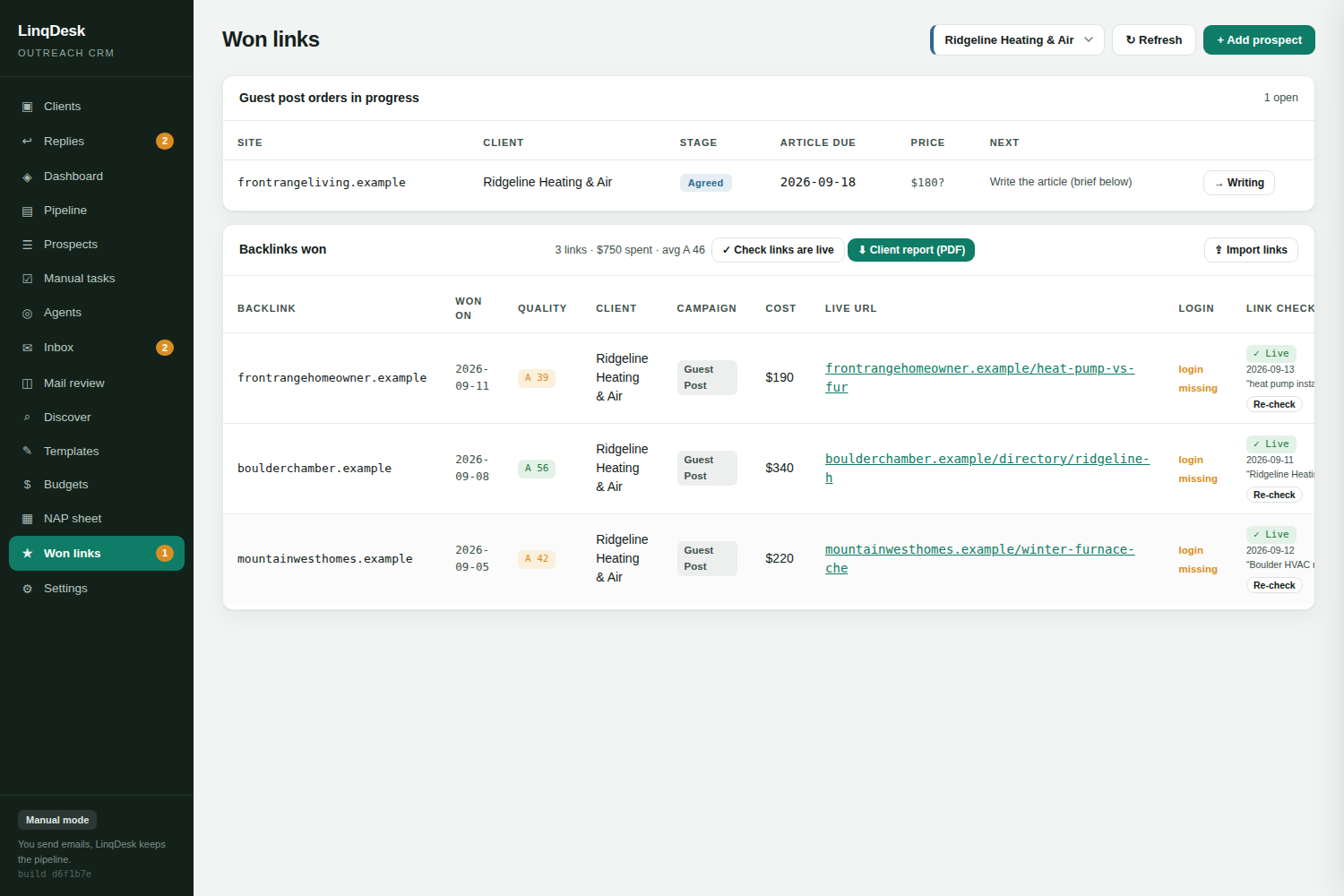
A reply that names a price is read for it and the quote lands on the prospect as an asking price, kept separate from the agreed cost. Every guest post then carries an order stage: agreed, writing, article sent, published, paid, with an article due date. A won link with a live URL moves itself to published, Paid stamps the date, and the won links tab lists open orders with overdue articles and money still owed.
One click writes the article brief for whoever is writing: title, meta description, outline, the two client links with their anchors, and notes, built from the client profile and what the host site already ranks for.
All month: the money
Each client has a monthly link budget and a maximum cost per link. Spend is deducted when a link is actually won rather than when it is discussed, unspent budget rolls forward so a quiet month funds the month where three good opportunities land at once, and quotes that have come in are shown against what is left to spend.
Data spend is tracked on the same principle. Every API call books its real cost, Settings shows the month to date against a cap you set, and each discovery run shows its estimated cost before it runs.
All month: keeping links alive
Every won link is rechecked weekly, fetched as an ordinary browser rather than as a crawler so a bot wall does not read as a removal. A page that 404s or now redirects to the publisher's home page is lost on the first check. A page that simply could not be reached has to fail three checks in a row. A link that quietly turned nofollow is emailed to you like a loss. The anchor text, target and rel are recorded every time, so you can see a link change rather than only disappear.
We wrote up the full logic, including why a 403 is not a loss, in the guide to checking whether a backlink is still live.
Month end: the report
One click produces a print-ready report with your agency name on it, the won links with their live URLs, and the stats, with no LinqDesk branding anywhere. Because monitoring runs all month, that report distinguishes links won this month from links still live from every previous month, which is the number that actually proves the retainer is compounding.
Optional: the agents
Four agents take work the rest of the app only prepared. Each runs in one of three modes per workspace: off, ask me first, where every action is written up and waits for one click, or automatic, up to a daily number of actions with the rest queued for approval.

- Replies. Answers interested prospects, agrees a price up to the client's maximum cost per link, counters once above it, nudges a quiet thread twice, closes a no, and stops for a person on anything ambiguous.
- Pipeline. Tops up a client that is short for the month, promotes a Maybe whose researched way in is high confidence, followed and affordable, runs the email finder on prospects with no address, and sends one daily digest.
- Orders. Takes an agreed guest post to a live link: brief, article, sending it in the thread, spotting the published URL in the editor's reply and verifying the link on the page.
- Browser. A separate process that works the manual tasks queue, filling contact forms and applications from the client's profile. In code, not just in its prompt, it never types a password, creates an account, answers a CAPTCHA, enters card details, invents a figure, or clicks submit when it is not allowed to.
Every agent action is a row on the Agents page and a line on the prospect's timeline, and anything an agent stopped on carries a hold with the reason until a person releases it. You can run the whole month with all four switched off, and plenty of agencies do for the first month while they build trust in the pipeline.
The short version
Plan the month per client, discover and score, find the way in, send from your own mailboxes, answer everything from one page, drive each yes to a published URL, watch the money, keep the links alive, and hand the client a report that separates won from still live. Create a workspace and run one client through it. That is the fastest way to see whether it fits how you work.