Is your backlink still live? How to check without fooling yourself
Every agency reports links won. Very few report links kept. That gap is where client trust goes to die, because the client eventually runs their own backlink check, finds four of the twelve links you invoiced for are gone, and nobody on your side knew.
Checking is not hard. Checking correctly is, because the naive version produces false alarms that are worse than no monitoring at all. Here is what actually goes wrong and how to read each case.
In this guide
Why links disappearThe six states a placement can be inThe 403 trap that fakes a lossThe silent nofollow swapHow often to checkWhat to tell the clientWhy links disappear
None of these are rare, and none of them generate an email to you when they happen:
- A redesign. The site moves to a new CMS and the old post either 404s or gets folded into a category page.
- An editor cleanup. Someone new takes over the blog, decides the outbound links look spammy, and strips them.
- A lapsed sponsorship. The chamber membership or team sponsorship expires and the listing comes down the same week.
- A quiet policy change. The site keeps your link but adds
rel="nofollow"orrel="sponsored"across every outbound link at once. - The domain dies. The publisher stops paying for hosting and the whole site goes.
Only the last one is obvious. The other four look perfectly normal to anyone who does not go and look at the page.
The six states a placement can be in
A link check that only answers yes or no is not enough, because "no" covers four completely different situations that need four different responses.
| What you find | What it means | What to do |
|---|---|---|
| Page loads, followed link to the client present | Live | Record the anchor and target, move on |
| Page loads, link present but nofollow or sponsored | Devalued | Treat as a loss for reporting, ask the publisher once |
| Page loads, no link to the client anywhere | Removed | Email the publisher, then write it off |
| Page returns 404 or 410 | Gone | Ask for a replacement placement or a redirect |
| Page redirects to the publisher home page | Gone | Same as a 404. A redirect to the root is a deletion with extra steps |
| Page unreachable, 403, or timed out | Unknown | Do nothing yet. Check again later |
That last row is the one most tools get wrong, and it is worth its own section.
The 403 trap that fakes a loss
A lot of publisher sites sit behind bot protection. Send a request with a crawler user agent and you get a 403, a challenge page or a timeout. Send the same request the way a browser would and the page loads fine, with your link right where you left it.
If your monitoring treats that 403 as "link removed", you will hand clients a report full of losses that never happened, chase publishers about links that are still live, and eventually stop trusting your own monitoring. That is the real cost: a checker that cries wolf gets ignored.
Three rules fix it:
- Fetch like a browser. Real user agent, real accept headers, follow redirects. You are not hiding anything. You are asking for the page the way a reader would.
- Separate "not found" from "not reachable". A 404 is information. A 403 is the absence of information.
- Use different thresholds for each. A 404 or a redirect to the home page is a loss on the first check, because that is unambiguous. An unreachable page should have to fail several checks in a row before anyone is told the link is gone.
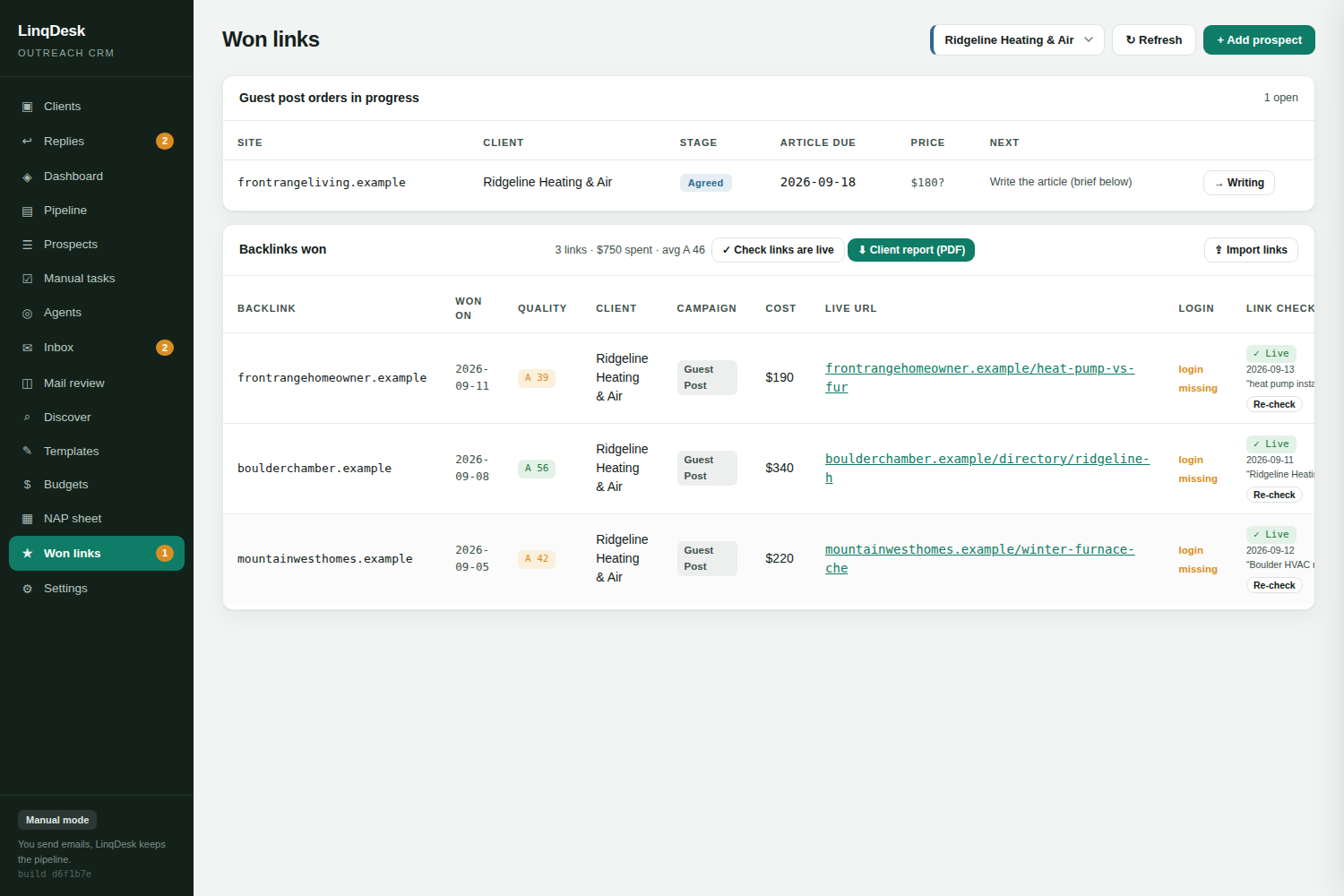
This is exactly how LinqDesk's weekly monitor behaves: it fetches each placement as an ordinary browser, calls a 404 or a home page redirect lost immediately, and requires three consecutive failures before flagging a page it simply could not reach.
The silent nofollow swap
The sneakiest failure is the link that is still on the page. Nobody notices it, because the visual check passes and most monitoring stops at "is the URL mentioned".
What you actually need to record on every check is the full anchor element, not just the presence of the domain:
- The anchor text. Publishers sometimes change a keyword anchor to the bare brand name or to "click here".
- The target URL. A link repointed from a service page to the home page has lost most of its value for that page.
- The rel attribute. nofollow, sponsored and ugc all need catching.
- Whether the link is still in the body. A link moved into a footer widget or an author bio is not the placement you bought.
Treat a nofollow swap like a removal in your internal reporting. It is worth one polite email to the publisher asking whether it was intentional, because sometimes it is a plugin applied site-wide by accident and they will fix it.
How often to check
Weekly is the right cadence for most agencies. Daily is noise, because publishers do not change links that fast and you will spend your time reading alerts about temporary outages. Monthly is too slow, because a link that dies in week one gets reported to the client as live for four more weeks.
Two timing rules are worth adding on top:
- Check a new placement 48 hours after it goes live. Some publishers post the article, then edit the links before it settles.
- Check every sponsorship link a month before renewal. That gives you time to have the renewal conversation while the link is still up rather than after it has come down.
One thing that has to be in place first: the client's website on file. A monitor with no target domain has nothing to look for, and reporting "link not found" when the real problem is a missing configuration is the fastest way to lose faith in the whole system. It should say what is missing instead of passing or failing the link.
What to tell the client
Do not hide losses. Links go down, and an agency that reports a loss the same week it happens looks more competent than one whose report is quietly 20 percent fiction.
The useful report has three numbers, not one:
- Links won this month. The number everybody already reports.
- Links still live from every previous month. This is the number that proves the work compounds.
- Links lost, with the reason. Redesign, sponsorship lapsed, editor removed it, site gone.
Attach what you did about each loss. "The chamber listing came down when membership lapsed on 3 September, renewal is quoted at 340 dollars, let us know" is a far better line in a report than a link silently vanishing from next month's table.
If you are tracking this across ten clients and two hundred placements, doing it by hand stops being possible somewhere around the third client. LinqDesk rechecks every won link weekly, records the anchor, target and rel each time, and emails you when one changes so you hear it before the client does.