The backlink prospects you cannot cold email
Open any outreach tool and it assumes one thing: that every prospect has an email address and the job is to write to it. Then you run discovery for a local HVAC client and roughly half the good opportunities have no email anywhere on the site.
The chamber wants a membership application. The youth league wants a sponsorship form. The manufacturer wants you to claim a dealer listing in a portal. The industry association wants an application with a reference. None of those are cold email problems, and if your process only knows how to send email, all of them quietly become nothing.
In this guide
The supply you are throwing awayThe five ways into a siteDecide the path once, at the frontWorking the non-email queueTracking something with no threadMistakes that cost linksThe supply you are throwing away
Local link building has a hard ceiling on supply. In a mid-size town there might be forty genuine opportunities in total. If fifteen of those have no published email address and your workflow silently drops them, you have cut your own market by more than a third and then complained that local links are hard to find.
Worse, the ones with no email are frequently the better links. A chamber, a city page, a school district, a manufacturer dealer locator: these are hard for competitors to get precisely because they take a form and a wait rather than a merge field.
The five ways into a site
Before anyone writes a single email, every prospect should carry a label saying how you actually get in. There are five:
- Public email. An editor, marketing or sponsorship address published on the site, or one found with an email finder. This is the only one that belongs in an automated sequence.
- Contact form. No address, just a form. Someone has to fill it in, and the reply comes back to whichever mailbox you typed into the form.
- Membership or sponsorship application. Chambers, associations, leagues. Usually a form plus a fee plus an approval step.
- Claimed listing. Manufacturer dealer locators, certification directories, platform profiles. The link already exists in principle, someone just has to claim and complete the profile.
- Account required. A portal you have to register in before you can submit anything.
And a sixth label that matters just as much: not checked. If the crawler got a 403, a bot wall or a timeout, you do not know what the path is. That is not "no path found", and confusing the two throws away good sites because one request failed on a Tuesday.
Decide the path once, at the front
The expensive version of this is deciding per prospect, by hand, at the moment somebody opens it. The cheap version is deciding at intake, once, and letting the label route the work.
A triage pass on a new prospect should do four things in order:
- Fetch the site like a browser, not like a crawler, so a bot wall does not disqualify a real site
- Look for a published address, then try the usual contact, about, write for us, advertise and sponsor pages
- If there is still no address, work out which of the other paths applies and record the exact page to use
- If nothing could be read at all, mark it not checked and try again in a few days rather than rejecting it
The output should be a next step written as an instruction, not a status. "Sponsorship page: /support-us. Tiers start at 250 dollars, the 500 dollar tier includes a website listing. Apply with the form on that page" is work someone can pick up. "No email found" is not.
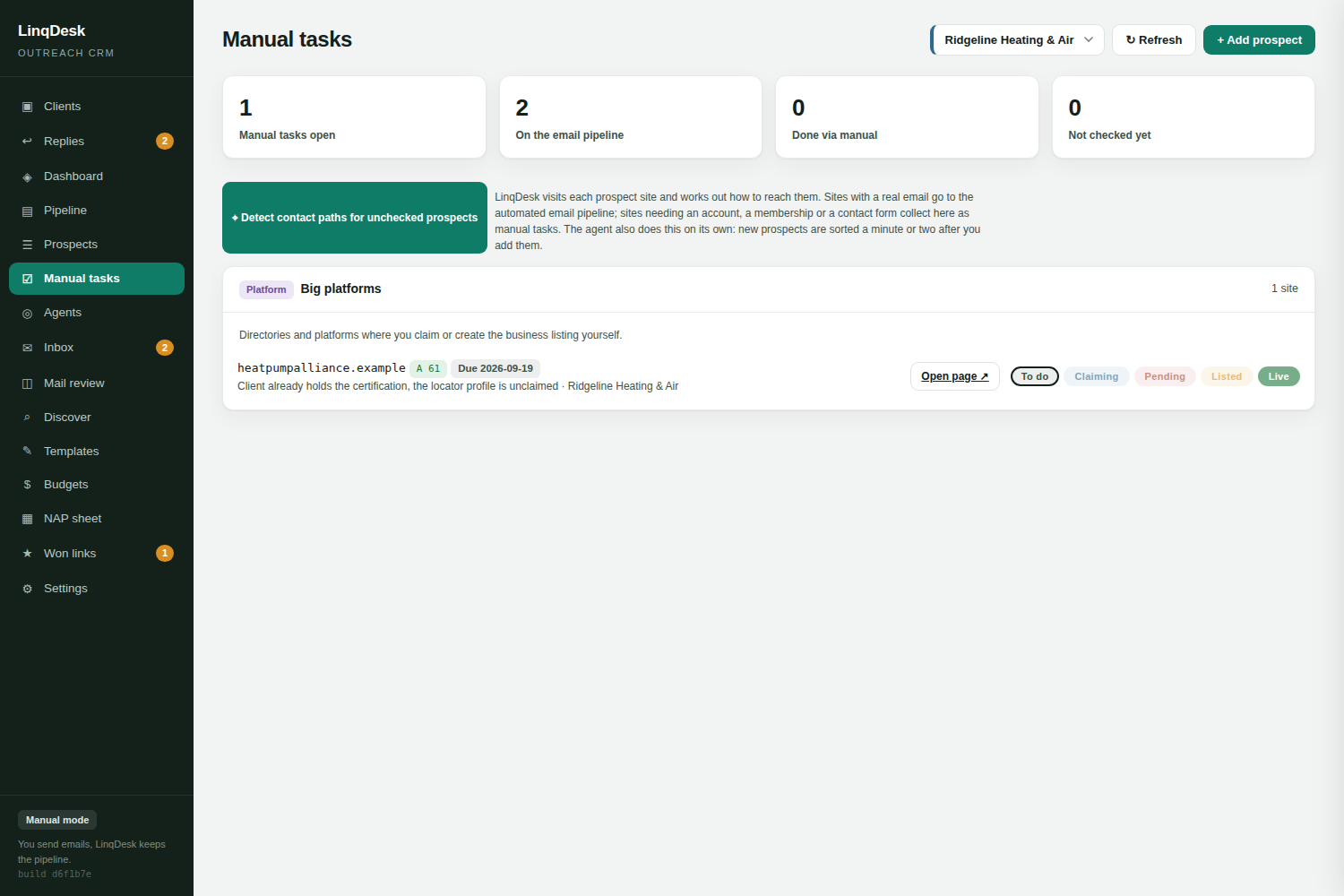
In LinqDesk this runs hourly on every new prospect, and the path it finds decides where the prospect goes: email paths join the sending pipeline, everything else lands on the manual tasks board with the page and the procedure already attached.
Working the non-email queue
Non-email prospects need their own board, because their stages are different. An email prospect moves through sent, followed up, replied. A form prospect moves through:
- To do. Path identified, nobody has touched it yet
- In progress. Someone is filling in the application, or waiting on a fee approval from the client
- Submitted. Form sent, now waiting. This stage can last weeks, which is exactly why it needs to be visible
- Live. The listing or page is up with the link on it
Two practical rules make this queue work. Put a due date on every submitted item, because a form with no follow-up date is a form nobody ever chases. And always submit with a mailbox you monitor, not a personal address, so the reply lands somewhere the whole team can see.
Most of the actual typing is the same nine fields every time: business name, address, phone, website, contact name, email, category, service area, short description. Keep them on the client profile so nobody retypes them or, worse, invents a slightly different address and damages NAP consistency across dozens of listings.
Tracking something with no thread
Email outreach tracks itself. There is a thread, timestamps, a reply. A submitted form has none of that, so unless you record it deliberately, the only evidence it ever happened is somebody's memory.
Record four things at submission time:
- The exact URL of the form or application you submitted
- The date and who submitted it
- The fields you entered, especially the email address used
- Any fee committed, so it hits the client's budget on the day it is committed rather than when the invoice arrives
Without that record, the same chamber gets applied to twice by two people for two different clients, which is the one mistake a chamber remembers.
Mistakes that cost links
- Treating a 403 as a dead end. Retry as a browser, then requeue. Most of these sites are fine.
- Emailing the generic address anyway. Sending a guest post pitch to a chamber's info@ because your tool only does email gets you ignored and sometimes blocked.
- Letting submitted items go stale. Applications sit in queues. A polite check-in after two weeks converts a surprising number.
- Different NAP on every form. Inconsistent business details across listings undo the local SEO value you were chasing.
- No owner. Email prospects have an automation. Form prospects have a person, and if that person is "the team", it is nobody.
The links your competitors do not have are usually the ones that took a form and three weeks. Build the queue, and that becomes an advantage rather than an excuse.